Tuesday, November 15, 2011

Great Ideas for Integrating Adobe Products in Higher Education Mini-Contest!

After exploring the new Creative Suite 5.5 from Adobe, it is impossible not to see the exciting ways we can integrate the CS options into our classrooms. In fact, today marks the beginning of a the "Great Ideas for Teaching with Adobe Products" Mini-Contest here at Communication and Higher Education blog as part of an exciting collaborative partnership with the blog, "A Millennial Professor's View of Higher Education" (http://www.millennialprofessor.com/). 
 
"Great Ideas for Integrating Adobe Products in Higher Education" Mini-Contest. 

Participants:
Faculty, Staff, and Students are encouraged to submit an idea! We encourage ideas focused on (but not limited to) the following:
- Classroom Ideas (Face-to-Face or Hybrid)
- Student Activities/Student Affairs
- Student Organizations
- Admissions and Recruitment
- Campus-Wide Events
- Supplemental Instruction
- Learning Communities
- Online Instruction/E-Training

Voting Period
The readers will vote on the best entries from Monday, December 5th to Friday, December 9th. The WINNER of the contest will receive a copy of the CS5.5 Master Collection!


Good luck everyone and HAPPY CREATING!

See the submission form below!


Don't forget, you can "like" Communication and Higher Education Blog on Facebook: http://www.facebook.com/CommHigherEdBlog

Monday, November 14, 2011

What does your signature say about you?

There's no in-depth handwriting analysis here, just a curious post about what your e-signature says about you. Many of us take a few moments with our email accounts to set up our "options" -- including a signature automatically added to every out-going email.

But have you wondered why you put certain information in your signature? In higher education, it is important to explore the ways we communicate (and how that communication might be interpreted).

I hadn't really considered this issue of e-signatures until I ran across a faculty member from across campus who I rarely see, but often email due to committee responsibilities. This person noted last week, "I am impressed at how available you are to faculty and students--you put it all right in your email." I didn't realize how much we might glean from an email signature.

Can you tell if a person is helpful,  available, pretentious, cooperative, flexible, technologically-up-to-date, willing to work, etc.? I'm not sure that you can get all of that from a simple e-signature, but these were terms that entered the conversation last week as we discussed what people choose to put as their signature. Laughingly, the person who noted my "availability" caught up another colleague in the conversation by saying, "You can Skype her or email or Tweeter her." After gently correcting the "Tweeter" term, I noted that I do prefer to give a lot of contact options--the same options are on my business card and syllabus. What is the use of these social channels and amazing technology if no one knows you are on them?

But there are many online opinions. In fact, most say the shorter the signature the better (name and phone number only) and others note a title, name, and phone number are important. And Wagner noted, "the longer your email signature, the lower down the food chain you are." Which, we might note by my example above, makes me an easy lunch. He also claimed the most important folks didn't seem to have a signature after reviewing his personal in-box. I'm hesitant to embrace a minimalist mentality when it comes to contacting me. I do have slightly different signatures for my different email accounts, which can be a good practice for those who want to avoid over-personalizing their workplace signature (with quotes and cute sayings or clip art).

Is there such thing as "too much contact information?" I really don't think so, though my signature may be a bit lengthy, it does allow people to reach me through a variety of options and has allowed me to connect with people via IM, Skype and Twitter that seemed faster and more appropriate than email. I met people at a conference over the summer (each living more than a thousand miles away from me) and we Skyped our way into a collaborative project.

There is a challenge to these multiple channels of accessibility: managing work-life balance. When you are available and always "on" for those around you at work, it can prove challenging to separate out the personal/home time and the "working" time. In fact, I often feel that I am always working, since I am always available and responding to inquiries from students, colleagues, etc.

There are a lot of resources about what "should" and "should not" go into your e-signature:
CBS "What should your email signature look like" 
"Food Chain" and signatures, by Mitch Wagner.
Signature blocks
"What to put in your signature"

Don't forget, you can "like" Communication and Higher Education Blog on Facebook: http://www.facebook.com/CommHigherEdBlog

Monday, November 7, 2011

More effective meetings

Ever feel lost in a cycle of meetings? For most of us (both junior and more senior tenure-track faculty members) are running through a huge cycle of meetings. We may spend our days rushing from one committee to another, to a department or college meeting, then to a sub-committee meeting...not to mention classes and office hours! One of my biggest pet peeves (aside from when presenters read word-for-word from a PowerPoint presentation...I am, after all, a communication professor), is the pointless meeting.

You know them well. You see them often. In such meetings, people become flustered, get off topic, take out the frustration (of a pointless or directionless meeting) on one another, and feel the little time they have in the day slowly sucked away.

My years of studying communication (thank goodness for those awesome Organizational Communication classes!) creeps in and tells me that meetings don't have to be slow, laborious, or dreaded. In fact, we can have highly effective, highly productive meetings. It isn't too difficult-- why, then, are so many meetings seen as a waste of time or unnecessary by the attendees? Try a few of these easy ideas in your area to avoid eliciting a groan every time you call a meeting (some of these ideas also work well for class preparation!).
  • Meet ONLY when you need to meet. If an item can be addressed without meeting, then take care of the item without meeting. This helps everyone avoid meeting "fatigue" and can perk up faculty members' or committee members' attitudes.
  • Have a clear agenda (which is manageable in time and scope)...then stay on task. Plan carefully! If you have a hot topic item, don't plan 5 minutes with 50 people. Think how you would like to see that item addressed, budget the time, and plan accordingly. This shows respect for everyone involved, allows voices to be heard on various issues, and helps your meeting to stay on time (and avoid the groans as you try to cram in 5 agenda items as people are streaming toward the doors).
  • For committees (especially) - have something prepared, due, or required for the meeting (make sure this is a significant contribution and not just busy work). Let the individual work happen outside of the meeting so that the collaborative time together can be maximized. 
  • Don't forget to have "action" items. What exactly is the purpose/desired outcome of the meeting? Plan that in advance, assign action items, and leave feeling productive and accomplished. Going in with a plan and a vision will make a meeting MUCH more productive! Also, those in attendance can see the purpose of the meeting and are less likely to begrudge attending.  Assign action items, or note what you (the meeting leader) will do with material generated in the meeting, so everyone knows that the project/task is moving forward and how it is moving forward. This also helps everyone maintain deadlines.
  • Set the next meeting date in advance (respect the schedules of others) or, at a minimum, set it before leaving the current meeting so everyone knows what to expect, when to complete tasks, and can clear their calendars to be present.
  • Finish a meeting by exploring what worked well and what needs to be continually addressed. This type of reflection can easily help foster improved progress, new ideas, and increased productivity. Be open to feedback and ideas from everyone (if you are leading the meeting). 
Don't forget, you can "like" Communication and Higher Education Blog on Facebook: http://www.facebook.com/CommHigherEdBlog

Friday, November 4, 2011

Changing face of university housing

After recently converting to a residential campus (from our previous commuter-campus status), I have been intrigued by the role the dorms can play in both campus activities and campus identity. I was glad to explore the article, "10 Innovative Housing Trends in Higher Education" and to explore some of the broader changes happening.

I can also note, somewhat reminiscently, after seeing our relatively new dorms (apartment-style living), that the world of campus housing has changed! I wonder what (if any) potential student would settle for the communal restrooms at the end of the hall, tiny bunk beds, and clunky, heavy furniture that we enjoyed as undergrads just a few short years ago?! Oh, and the always-creepy laundry room in the basement, let us not forget that. Today's students likely don't have to worry about such issues. The wifi, four room, full kitchen living environment of  offers a very different student experience than I had.

I can remember sitting with my back against one wall of the dorm and my roommate sitting the same way across from me and our feet touched easily in the middle of the floor. Very different from the list of amenities found on our campus housing site which notes,

  • The beautifully designed units are fully furnished and offer amenities such as a computer lab, a fitness room, an activity center, on-site postal service, shuttle service, and telephones.  The units are affordable and include the cost of utilities such as telephone, cable and internet.  Financial aid is available for those students who qualify.
  • Residents may select from a single bedroom, double bedroom, or four bedroom occupancy apartments. Each unit is equipped its own laundry room complete with a washer/dryer and a living room. Additionally every unit has:
    • Standard college furniture  such as bed, dresser, desk, chair, and sofa
    • Stove
    • Refrigerator
    • Dishwasher
It is worth exploring your campus housing, see what your students are working with and even see if there are meeting spaces or areas for club activities. You may not even realize just how much today's residence halls have changed!


Don't forget, you can "like" Communication and Higher Education Blog on Facebook: http://www.facebook.com/CommHigherEdBlog

Tuesday, November 1, 2011

Data Monster

Image from ArkansasRealtors.com site
The Data Monster awoke hungry and angry. She rose out of the dark, damp Cave of Quantitative Remorse and blinked her bleary eyes. She was searching for something, if only her sleep-slowed brain could remember what it was...oh yes, breakfast! With her new goal firmly affixed in her mind, her eyes scoured the plush lands of Qualitative Research World. Where would she find something to eat at this hour? Ah, yes...in Year5--a tiny neighborhood in the TenureTrack division of Qualitative Research World. Why should she go to Year5? Because it had the easiest people to eat! They were slow, groggy, focused with a delightfully distracted air, and they sometimes wandered too close to the Cave of Quantitative Remorse. 


The Data Monster turned her massive head slowly, her eyes becoming rapidly clear as she spied one lone researcher wandering too near the Quantitative realm. Why on earth would this pathetic figure attempt to navigate Quantitative landscape? She obviously belonged in Qualitative Research World...her excursion into the Data Monster's turf was not her first, but her survival skills were lacking, her knowledge incomplete. Without a doubt, breakfast was served. Data Monster swooped in and, in one swift movement, clasped a talon-filled claw around the poor Year5, who would soon be out of her misery.

Yes, despite my training in qualitative analysis, I have several projects that have emerged with quantitative data. While I have no objection to quantitative analysis, I most frequently employ qualitative analysis and have found myself rather rusty and (gasp) unclear on the quantitative maneuvers now required of me. I feel that there is a giant road block in the way -- blocking the END of several projects. I can see the end, I even know (roughly) how to get there, I just forget how to move over the terrain. Isn't that sad? Projects stalled by my own lack of ability...and in year 5 of the tenure-track I have absolutely no time for projects to be stalled or delayed.

Situations like this (I expect and in a sick way rather hope) have happened to others. I don't want to be alone in this silly move to switch from one area of comfort and knowledge to a less known, less comfortable area. Resolving such situations can be tricky. Do I seek assistance, tutoring, lessons and read every book from my long-past classes in statistics class? (CHECK!) Do I ask someone on campus in a more quantitatively inclined field? (CHECK!) Do I sit and bemoan my situation as I feel my research progress grind to a halt? (CHECK!) These efforts to overcome my inept ability have put me on the time lines of others, left me waiting with hope and commitments only to later be turned down, disappointed, and another week or two delayed as first one person, then another, tells me they can and will help only to later change their minds. Their choices are understandable. We are all busy. It doesn't make it any easier. Navigating the quantitative (or qualitative) realm after working so long in the qualitative (or quantitative) one can challenge any researcher. It is exciting to learn new skills and explore data in a new way, but it is also difficult during the middle of a busy semester.

I have employed the options above and now feel stuck, again, waiting and hoping for some grain of knowledge to magically appear as I re-read my stats text from ten years ago -- perhaps that knowledge will come, dressed as a shiny, silver Knight brandishing a sword (suspiciously shaped like an obscure statistics symbol) ferociously bellowing his presence to save me from the clutches of the Data Monster--who is at this time holding me hostage in the Cave of Quantitative Remorse.

Of course, I know I can and will, save myself. The question is, can I do it in time?

 Don't forget, you can "like" Communication and Higher Education Blog on Facebook: http://www.facebook.com/CommHigherEdBlog

Thursday, October 27, 2011

The lost ink pen

A student walked into class last week and did not have a pen for the exam. I mentally rolled my eyes and began the internal dialogue, "How do you come to class without a pen? I would never go to class unprepared. Why, I remember my time at Purdue and..." I think we have all experienced a similar moment of comparison and slight frustration.

The pen versus the keypad?
Later, I went to a meeting, grabbing my trusty iPad. This semester (I got my university-issued iPad in late June), you can find me in any meeting diligently typing notes, emailing action items, and feeling very proud of my productivity with this new device. I photo-scan the documents for the meeting or save them in my dropbox and so carrying files has become unnecessary. I felt very prepared for the meeting and very on-top of the agenda. In fact, I rather smirked at the paper copies of a handout and wondered when we would all use the technology that had improved my life so much. Quite pleased with my efforts during a busy term, I sat anticipating the start of the meeting. When the sign in sheet came to me I paused awkwardly and had to ask the person next to me for a pen! I had everything I needed in my iPad and forgot a writing utensil. I felt myself blush and hurriedly scribble my name.
My new companion to every meeting

Then, I (mentally) apologized to that student (who had received a mental eye-roll) earlier in the week. How can I become frustrated for something for which I am now equally guilty? 

I love technology. I love the accessibility it gives my students and the way it eases my workload so I can communicate and contribute from a distance. It makes me more productive (generally).  And it is changing the way we do many things in higher education. While many of us are expecting these big changes to continue to wash over us, we may not be on the lookout for the small changes in our students and ourselves.

In class yesterday, I said "refer to the textbook" and prepared for the onslaught of, "but I don't have my text!" I was pleasantly surprised to see many of the students pull out mobile devices, tablets, laptops, netbooks and pull up the e-book. It was a great moment. Of course, I then tweeted about it.

So before we judge the student for texting, let's reflect on the last meeting we sat through and how many professors had out their mobile phones, took a call, took notes on it, texted, or emailed. 

So often we (professors) are concerned about the distractions of our students' technology items (status updates, IM-ing, texting, and generally not paying attention) and are reminiscing about the way things used to be that we can easily forget two things: 1) the things we may get frustrated about are likely the same things we are starting to do, and 2) there are many benefits of those same devices on our classroom environment.

Yes, we should still use technology politely and attentively when in a meeting or classroom. But, honestly, I can take notes faster on my iPad or Blackberry, email them or save them, and accomplish work faster during the meeting that would otherwise suck all of my time once the meeting ended. Should I fault my students for doing the same thing? They are using their e-calendars, their reminder-apps, their e-books, and yes, on occasion updating their social media. But before we suggest that students "put away the phones" we might want to consider the role those devices play in our learning environment--especially for our younger students who may feel more natural touching a key pad than holding an ink pen.

Don't forget, you can "like" Communication and Higher Education Blog on Facebook: http://www.facebook.com/CommHigherEdBlog

Friday, October 21, 2011

Tech tools to avoid the midterm slump

You walk into a classroom to see students huddled over stacks of papers, note cards, and graded quizzes with either a coffee cup or a wad of tissues in their hands. They are in various stages of preparation and dress--from pajamas and crumpled pages of notes to meticulous dress with color-coded flash cards. As you enter the classroom on exam day, they look up at you with equal expressions of wariness. Based on your excellent deductive skills you know it must be midterm season. Why else would they give you such a look as they sniffle their way through another cup of coffee?

Photo by Lora Helvie-Mason, edited using Picnik.com

There are a few things we can do to ease the midterm season for ourselves and for our students. These are minor actions, but they may guide us to better manage the mid-semester slump.

Check out some technology that can assist your grading (see previous entry "Grading Gadgets"). Such tools often help students to track their progress and receive more detailed feedback. There are many opportunities these days and, to update the nearly 1-year old "Gadget's" entry, there are more grading tech options than ever, including:
You might consider the free trial options for some of these programs OR explore the rubrics in your LMS, if you have one. Technologically adapted rubrics can provide easy grading and opportunities to insert more comments than you would if your hand is cramping up on the sixtieth time you write "restructure for clarity" or "unclear thesis" on an outline or paper. Using the LMS rubrics can need some clarification -- it is easy to seek the Help features, but I also love to search for a video explanation/demonstration -- these are often on YouTube or Vimeo and provided by the companies themselves OR by users who can answer the exact practical questions I might have. (Example: Blackboard Rubrics Explained video).

Though some options cost, there are also many free resources for educators, the trick is finding one that works appropriately for your needs and that you feel comfortable with. Start with your LMS, but don't feel locked into their system. Go explore! Consider sharing your ideas of what works best (and what to avoid) with a comment or suggestions.

Best wishes for a productive midterm season! 

Don't forget, you can "like" Communication and Higher Education Blog on Facebook: http://www.facebook.com/CommHigherEdBlog

Monday, October 17, 2011

Faculty and first names

This past summer was a busy one for me. I was on a lot of committees, working on a few grants, and trying to revamp courses with a new text. I was rushing across campus from one meeting to another and hear, "Dr. Lora, wait!" and "Dr. Lora, can I ask you a question?" Another faculty member laughed and said, "Oh Dr. Mason, I didn't realize when students asked for Dr. Lora's classes they meant you! I assumed they had a wrong name or were misinformed." In fact, MOST of my students tend to address me with my title and first name. This was not something I initially encouraged, as I had read articles about younger-appearing faculty (and females) and issues of authority, I wanted that hard-earned "Dr." to be articulated. When I joined the rank of faculty member, the closest faculty member to my age at the time was 18 years older than I.

But after several weeks here in the South, I started to feel like the name thing was a losing battle. Many of my colleagues immediately dropped the hyphen in my last name and most of my students began calling me "Ms. Lora" the first day of my first semester. I encouraged them to be more formal and, somehow, we ended up with a hybrid of "Dr. Lora." I don't believe this was a sign of disrespect, but it got me thinking about the forms of faculty address, perceptions of authority, perceptions of approachability, and the relationship between students and faculty. This was especially true after an older male began in our College and was, to my knowledge, never addressed by his first name. Then a male younger than myself arrived and, again, was not addressed by his first name. As we shared offices in tiny FEMA buildings post-Katrina, I feel confident in saying that the students did not address either by a first name (with or without a title before a first name).
Image from www.nametags.com

Was the use of a title determined by age, sex, or other characteristics (such as teaching style and perceived approachability)? Rubin (1981) found that "female professors, especially those in the 26–33 age group, were addressed by first names more often than their male colleagues." Despite introducing myself as "Dr. Helvie-Mason," students immediately went for the first name.

After a few semesters, I laughingly tell my students, "I don't care what you call me as long as it has a Dr. in front of it and you could say it to your mother or minister." I let go of trying to change the way I was addressed as it seemed to be a waste of energy when there was no damage to the class environment...indeed, I often wondered if it helped. In the end, I let the students decide and answer to "Dr. Lora" or "Dr. Helvie" or "Dr. Mason" or the rarely used, but entirely correct "Dr. Helvie-Mason."


I do get disgruntled about the last name, on occasion, as I have been told by colleagues and staff (somewhat regularly that "You can't be "half married" so why would you split your name?" or "Oh, you're one of those women" with a look that I cannot possibly understand), but since my transition from the Midwest to the South, I have been known by the majority of my students as "Dr. Lora" and I have been honored with classrooms full of engaged, dedicated students. However, I am uncomfortable when a student addresses me by solely my first name--it is too personal, too informal and so I redirect the students whenever that happens.

Looking into this naming pattern has been interesting. There are a few points of research out there that might inform our understanding of the students' and professors' views of titles and their uses in academia.

Exploring graduate students and professor titles, McDowell and Westman (2005) wrote, "Students rated faculty members addressed by first name as warmer and more approachable and as valuing and respecting the students more than faculty addressed by formal title. Being on a first name basis made a difference for the emotional tone, but it did not make a difference in the professional aspects of the relationship, such as respect for the faculty member, perceived objectivity in faculty's grading, or student motivation to achieve." Interesting!

So, perhaps we return to Shakespeare and ponder, "What's in a name..."  as we continue to explore the implications of faculty address.


Kuh, G. O. (1995). The other curriculum: Out-of-class experiences associated with student learning and personal development. Journal of Higher Education, 66, 123-155.

McDowell, J. E., & Westman, A. S. (2005). Exploring the use of first name to address faculty members in graduate programs. College Student Journal, 39(2).

Rubin, R. B. (1981). Ideal traits and terms of address for male and female college professors. Journal of Personality and Social Psychology, 41(5), 966-974. 

Takiff, H. A., Sanchez, D. T., & Stewart, T. L. (2001). What’s in a name? The status implications of students’ terms of address for male and female professors. Psychology of Women Quarterly, 25, 134-144.

Related Communication & Higher Education entries: Gen X women at work in the academy. 

Don't forget, you can "like" Communication and Higher Education Blog on Facebook: http://www.facebook.com/CommHigherEdBlog

Wednesday, October 12, 2011

Faculty job descriptions

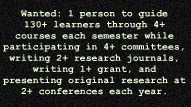
Wanted: For immediate opening, 1 person to guide 130+ learners through 4+ courses each semester while participating in 4+ committees, writing 2+ research journals, writing 1+ grant, and presenting original research at 2+ conferences each year. Applicants should be energetic, eager to embrace continuing education, willing to advise student organizations, collegial (and willing to work for several years before ever knowing if your work is of the quality to achieve tenure).

Some days this type of paragraph may describe faculty life! I love the variability of faculty job descriptions, the ability to denote specific time to certain projects, the way we can switch from one area of tasks to another when we are tired or need a boost. Sometimes, though, it can be overwhelming.

Image created using Picnik.com
My advice after a VERY hectic couple of days: set your own priorities and avoid adding others' jobs to your description if/when you can help it.

Personally, it is very easy for me to fall into the "helping" mode where I offer to help with items: I review a student's application before she submits it for a new job, I offer to do a task item to help a committee member, I note I could teach a mini-session for faculty on a technology issue, I perk up at an idea and offer to spearhead a task, eagerly, I state that I would happily help write, research, edit, etc...because I'm excited by the work or because I feel obligated (pressured).

It is also easy for junior faculty members like myself to be pushed into that helping mode...Less nicely stated, it is very easy for work to go to the junior faculty members. Perhaps the people around us want us to get more experience. Perhaps they simply don't want to do the work. Perhaps we are the most qualified for a certain task. I get "nominated" or "drafted" an awful lot for a variety of tasks that ultimately make me feel like I am doing the work of three people. 

Maybe it just feels that way because what we do covers so many different (and sometimes competing) types of work.

Whatever the reason, it is easy for your job description to quickly feel like it includes the jobs of others.

For junior faculty, we may not always have the choice or the ability to speak up and use that all-powerful "no" word. But, we can work to manage our tasks, prioritize, and focus on a well-rounded packet come tenure time. I am a sucker for all things organizational. From calendars to apps, I embrace prioritized task lists and scheduling to help with the overwhelming feelings that can come up in these pre-tenure years. Institutions vary in expectations, but here are a few resources to explore your workload, your tasks, and your ability to cope:


REMEMBER: Visit your faculty handbook and institutional documents noting expectations for faculty members, workload, and policies. 

http://www.glasbergen.com/tag/cartoons-about-job-stress/


Don't forget, you can "like" Communication and Higher Education Blog on Facebook: http://www.facebook.com/CommHigherEdBlog

Friday, October 7, 2011

Online public speaking classs!? YouSeeU to the rescue!

Don't stop me in the hallway, I'm likely to bend your ear for a while about benefits of online learning or some technology to use in the classroom. I'm notorious for bringing up tech-based ideas in meetings ("why not use a GoogleDoc?"). I can't help it. I love teaching and I love technology. I have designed and taught online courses for over five years. I have taken many courses, sessions, and workshops on effective online teaching. I bring a passion to online learning. I believe in the increased accessibility, convenience, and new pedagogical promise of an online environment. I embrace the collaborative tools and exciting techniques we can use to engage our online students. But there can still many challenges to online learning.

I designed and teach our institution's fully online public speaking course (and yes, at this point most scholars turn to one another and ask how you can teach public speaking online...). Over the past five years, I have modified, enhanced, tweaked, and altered the course. My vision was a course that mirrored not only the rigor, but also the feel (sense of community) and opportunity for growth students can find in the on-campus public speaking course. There are a few things I will never change about the online course. One: the students must deliver their speeches in front of a live audience (and record them). Two: the students must be able to see classmates' videos.

These requirements can lead to student stress. They must plan ahead to accomplish their speeches--but I require the online course to have the same "public" speaking feel and focus as the on-campus class and a webcam head shot video where students speak to computer screens won't cut it, in my opinion. Students work with a live audience found from their co-workers, neighbors, colleagues, church attendees, etc. They then record and post their presentations for their classmates to view.

There are a plethora of privacy concerns when it comes to student work and the web. I have laboriously crafted several techniques using private groups with password-protected video rights that are then embedded in our (password-protected) LMS, but that is a huge headache. I've been looking for an easier option. This semester I found it.

YouSeeU is a site tailor-made for my course. I have enjoyed using it as it can easily work within the LMS and it has excellent support for students (and for me!). YouSeeU is a place to exchange and view video presentations securely. It works well for collegiate classes since students can add slides, work in groups, complete oral exams, and get grades/comments in one secure location.

My students can upload speeches from their cell phones, web cams, camcorders. They literally only have to click twice to submit their work. EASY.
Assignment list and options (professor view)

Student view
When I created my YouSeeU course, I got an ID that the students use to log in. The directions to course creation and assignment creation were clear and the site is helpful. I have a list of assignments (see picture) and can modify the due date, closing date, points, etc. Students simply select from an upload or record option once I make an assignment available. If the due date passes, they can't upload. Once they submit, they can't remove it--so the work is officially in my hands just like the traditional speaking class (you can also do a one-time take with the "oral exam" feature on YouSeeU so students can't record their speeches multiple times trying to get it "just right" -- a situation they would not have in a traditional, on-campus classroom). The classmates can easily view the speeches and leave comments, rate, and engage with one another.

Copy of part of my rubric for the Informative speech
As a professor, I particularly value the rubrics (click and grade...a huge time saver) which can be created for each assignment and has tons of room for a variety of constructs to be measured. It does not take much time to set up and the ability to click-and-grade while viewing saves me a mountain of time in the large online course. The students can see the feedback easily.

Professors can archive videos and use them again (I have sought permission from a few students to do this with their videos in upcoming terms so I have examples readily available for the students). There are many tools for professors to use today in online courses, but I haven't seen such a perfect fit for my courses in a long time. You can view a comparison chart on the site to explore what YouSeeU offers that may be different from the tool your class may currently utilize.

A few notes: 
Use the great resource from YouSeeU that provides pre-written student directions for logging in and using the site. I just pasted this information into Blackboard (our LMS) and added my class identification number. Very simple.  

Clear directions and helpful links throughout the site
Students should record with a lot of light (good for any video) to help keep the quality of their presentation high.

The uploading time can be variable depending on file size and internet connection. Most of my students struggle with a consistent internet connection at home and use mobile devices that appear to take slightly longer to upload.  

The rubrics are worth exploring! At first I thought I did not need to look into them since I have a detailed evaluation sheet for each speech, but they are very easy to use and I have been able to add my (lengthy and detailed) public speaking evaluation sheets easily. Grading is now a few clicks and the scores are totaled for me. I can also leave comments (or even use pre-set standardized comments that I submit and then easily use with my rubric).

Ask for a demonstration or view the videos and resources on the YouSeeU page. It is targeted for educators and students (no random commercials or videos of kittens here), directions are easy to follow and processes are intuitive for both professors and students.

This semester, YouSeeU has been a great addition to my online course and one that I will continue to use as long as I am responsible for the online communication courses at my institution. YouSeeU makes it much easier to answer that question, "How do you teach public speaking online?!"


Don't forget, you can "like" Communication and Higher Education Blog on Facebook: http://www.facebook.com/CommHigherEdBlog

Monday, October 3, 2011

Embracing student feedback with word clouds

There are many ways you want to start your day. Hearing students rapid-fire complaints about an upcoming assignment isn't generally one of them. I started many days last semester where several students relentlessly complained about an assignment in the course. They didn't do the work, they didn't like the assignment, they didn't see how it fit the course, they did not want to do it. None of these complaints are new, but they can be incredibly frustrating. I felt defensive and tired of it. In fact, the instinct to roll my eyes had to be heavily fought. When we finally finished the project though, most students loved it.

I saw one of my former students who lead this complaint-brigade the other day on campus. She stopped me and said, "I'm so glad we had to do that assignment. It was so helpful for my major!" I asked her why she spent every day complaining about it during her semester in class and she said, "I thought it sounded stupid. I didn't get it at first." 

It was a big lesson for me. While I can still sense the (slight) desire to roll my eyes and tell the student to trust me as the professor when they express concerns like this, there is a grain of truth to the students' comments. Why not put the ego aside and embrace the student feedback? Let's use such comments to clarify and redirect future projects, and (the new lesson for me) rename, repackage, or re-present an assignment that led students to whine/complain the previous term.

In short, we need to market our assignments to help EXCITE students about a project while explaining what is expected and how it will be assessed.

One way to determine if your assignment falls into the "students will whine about it" category is to put it into a word cloud. In the past, I have mentioned the usefulness of Wordle, a word-cloud tool and I used it again after the summer term to help re-package a few of my assignments. Word clouds show which words most prominently feature in a speech or other written text. The most repeated words are larger in size. Wordle is great for speech analysis. I have also used it to analyze my syllabus. Seeing which words come up most frequently helped me to see the assignment from a new perspective. My wiki class assignment (the one the students were moaning about last semester) is one I am currently repackaging to have better student appeal (and therefore cause less need for class time to explain, justify, and address student issues). Here is the Wordle of the wiki project last semester:
Before restructuring

 The most prominent words before I restructured did not apporpriately identify or explain the actual assignment--which might explain why some students did not realize the importance or impact of the assignment. Of course the assignment seemed clear to me (from my insider-pedagogical vantage), but something was obviously leading to student distress. I reflected on the mission and intent of the wiki assignment. I re-wrote the assignment description and information after seeking student input. Then I put it into a word cloud. Here is the result:

After restructuring
The students can now see that this is a wiki project, a group project, with digital information, links, content, and application of chapters (by pulling out the most prominent words). Even further, they can see some of the expectations and assessment options--items that don't show up nearly as well in the earlier word cloud. This semester I have had MUCH less confusion, complaining, and discontent over the assignment. My concerted effort to repackage the assignment from the student vantage has seemed to reduce the stress and uncertainty of the students. The result? Better informed students who buy into a class project/assignment and a professor who does not feel she has to repeatedly justify an assignment (while avoiding eye rolling).

Why not give it a try? Explore how your assignments reflect your goals...and try a word cloud to help you "see" what the students may see.

[Eager for more? Try to put your student evaluations into a similar format for review...see what characteristics, assignments, etc. the students write about most frequently. Use the student feedback to guide your work and the purposeful, pedagogical changes you make in your instruction/course.] 

Don't forget, you can "like" Communication and Higher Education Blog on Facebook: http://www.facebook.com/CommHigherEdBlog

Friday, September 30, 2011

Mock productivity

Imagine yourself at mid-day: clipping along, fast-paced, mentally feeling proud of your efforts as you move through the massive emails and return calls or head to committee meetings. You've taught two classes already, held office hours, attended a committee meeting, revised a quiz for class, and returned phone messages before addressing the emails. Somehow, those emails grow and time slows down before you feel your pace slacken, your motivation wane. You really just want to get through these emails and get to work. Real work. Except, you didn't actually accomplish that much before noon, did you? Sure, you were euphoric, you felt accomplished. But think about it. When you get to the end of the day, will you reflect on what you DID accomplish or will you realize all of the important things you DIDN'T work on? Was the effort truly productive?

This feeling of working hard all day only to end up in bed at night wondering how I could put in so much effort and get so little accomplished has haunted me on certain days. I find myself growing frustrated, blaming others, and wondering how anyone survives this last year before the tenure review.
Image created using www.picnik.com

Truly, though, the problem is mine. I am involved in way too much "mock productivity" -- work that FEELS like productive efforts, but does nothing to move a project, article, or event forward toward completion. This "mock productivity" may be a fact of faculty life. It may be a necessary part of our world. We have to expend a lot of effort just to get to our actual work! There are many mornings where I work diligently for a few hours just to get to the point where I can really work. The point where I can open the data set, dig into the literature, examine a teaching lesson, prepare materials for a grant. The "work" side of faculty life is hard to actually get to due to all of the other items that can, easily, creep into our days. There are several culprits: email, distracted methods of working, and poor planning. Chief among the tasks feeling most like productivity in disguise (dubbed 'mock productivity') involves email. With a large number of students, advising a student club, working on collaborative projects, general departmental and institution needs, and (let us NEVER forget the service...) committee communications, the emails seem to require half a day!

No matter how I rant about it, or how I seek someone to blame, the mock productivity is my own fault. I own it. I have a tendency to ALLOW time-stealing culprits to transform efforts toward genuine productivity to become mock productivity. I do this by being "on" all the time. Students drop in, a committee session is called, a colleague needs help with a situation, I get pulled into an impromptu meeting in the hallway. I am distracted.

Lastly, I'm always connected to my email and when that 'ding' happens I feel as if I simply must respond. I want to answer quickly and therefore, remove the email. It feels like marking an item off a list when I hit the "delete" button. But, even though I rationalize that a fast response now means I am less likely to have a bulky in-box later, this is poor logic. The email distraction eats away at time. Before you know it, you're completely derailed.  

I am, therefore, distracted easily by a phone call/email (or random shiny objects that will promise an escape). These distractions let me break away from tasks requiring more involved thinking or that are higher pressure...(procrastination?!). Lastly, I need to continue my growth when it comes to planning. Though I have recently dedicated email-free, phone-free research power hours (see Research Power Hour entry), I haven't done the same for my other faculty duties such as teaching and grant writing. I need to, perhaps, make most of my day an email-free zone and only address emails at certain, dedicated times. Though that may seem to add bulk to the in-box, it will, in all likelihood, keep me more productive on bigger projects.

Managing these time-eaters, these "mock productivity" items/feelings, will certainly help me reach the work I really want to do. Kyvik (2010) noted that the increase in academic publishing does not change the trend that a few faculty members typically do most of the publishing/research work. Those few are likely embracing the word "no" more frequently and can be more focused on their research productivity (see Super Power of Productive Faculty entry). They are, likely, protecting their time better.

As Lackritz (2004) reminds us, burnout is a common experience in higher education -- particularly for those with a high number of students and a high amount of activities to manage. But working on the type of work YOU find engaging can actually stave off burnout. In fact, faculty members who spend their time on the work they find most meaningful, have less of a risk to experience burnout, according to Shanafelt et al. (2009).

Be reflective. Where are you spending MOST of your effort?. Is it on the work that is truly meaningful, the work that will be "counted" when it is tenure/retention time, work that you find rewarding? ... Or is the bulk of your effort spent on false feelings of success? On mock productivity? 

Image created using www.picnik.com


Lackritz, J. R. (2004). Exploring burnout among university faculty: Incidence, performance, and demographic issues. Teaching and Teacher Education, 20(7), 713-729.

Kyvik, S. (2010). Productivity of university faculty staff.  International Encyclopedia of Education, 3rd edition, 455-460.

Shanafelt, T. D., West, C. R., Sloan, J. A., Novotny, P. J., Poland, G. A., Menaker, R., Rummans, T. A., & Dyrbye, L. N. (2009). Career fit and burnout among academic faculty. Archives of Internal Medicine, 169(10), 990-995.


Don't forget, you can "like" Communication and Higher Education Blog on Facebook: http://www.facebook.com/CommHigherEdBlog


Tuesday, September 27, 2011

Assistant Faculty Life and Kids


Readers, please welcome Anthony Garcia, a guest author for today's Communication and Higher Education blog! Anthony offers an exploration of children and life in academia in his post, "Assistant Faculty Life and Kids." Anthony, MA Literature, explores research emphasizing contemporary Native American fiction, gender studies, and American culture. We all can benefit from this much-needed exploration into families and tenure-track life. See also the earlier post: "Gen-X women in the academy."

Assistant Faculty Life and Kids

Not only is the job market at academic institutions extremely competitive, but the pressure and stress that assistant professors undergo in their push toward tenure can put their lives on hold. Although embarking on relationships like marriage and family is not out of the question, the schedule of an assistant faculty member juggling service, teaching responsibilities, and scholarly pursuits can place a lot of stress on a relationship. Women especially often find that having and raising children can be an impediment to achieving tenure.

The life of a faculty member straight out of a graduate program is full of pressures and stresses. First, tenure-track requires time-consuming research that has or will lead to multiple scholarly publications, possibly even a published book. Second, service on multiple committees and as a department representative can also demand several hours a week. Additionally, these scholarly writing and service requirements are placed on the shoulders of a fairly new assistant professor teaching a full load of classes. As a result, assistant professors can easily find themselves working at least 60 or 70 hours a week.

So how do children fit into this equation?
Gregory Semenza, author of Graduate Study for the Twenty-First Century, notes that women who go directly to graduate school after college find themselves on the tenure-track between the ages of 30 and 35. Consequently, women whose ideal situation is to wait until earning tenure to have a family might feel pressure to have children before age 35, the year in which the healthcare community begins to view the pregnancy as high risk. He concludes that the pressure of having and raising children may be one reason that women make up a minority of the professoriate.

Taking this idea further, Kelly Ward and Lisa Wolf-Wendel indicate in their article, "Fear Factor: How Safe is it toMake Time for Family," that in the past faculty members, particularly women, chose to forgo having children in favor of their careers, but now more and more assistant professors are attempting to have both. Ward and Wolf-Wendel have found that academic institutions generally provide little support, whether in time, money, or personnel, to women endeavoring to have children. Many institutions do not offer faculty members paid leave for childbirth, and at those that do, women often feel that taking leave would hurt their careers. Some schools, aware of this issue, have provided a way for women to take a year of unpaid leave in which the tenure clock stops. And while this stop-clock offers women a pseudo-answer to the dilemma of having children while pursuing full professorship, many still struggle to balance the time and pressure of raising a family and furthering their careers.

But these pressures also extend to male assistant professors who have children. Because of the competitive nature of academia, many find it difficult to balance time with family and time spent on scholarly pursuits. Children can throw a wrench in even the most organized of schedules by falling sick, going on a field trip, or simply asking for your support at a sporting event, and parents who want to be involved in their children's lives must often sacrifice some aspect of their work. As a result, both mothers and fathers can face stress and exhaustion in their quest to further their careers while raising children.

It has been noted that those who enter academia later in life, with older children, have an easier time pursuing tenure since their children's ages do not require as much time as infants and toddlers might. On the other hand, these same professors often struggle early on to put themselves through graduate school while raising young children, and many find their job prospects diminished because their careers hold less potential than their younger PhD-holding counterparts.

More and more, academic institutions are recognizing both the gender gap of tenure-track faculty and how this gender gap represents the difficulty that having children poses for assistant professors. As more thought is being given to how universities can hire men and women as full professors without compromising their family lives, policy advancements are slowly being made. These advancements though, slow as they are to appear, still leave the majority of assistant professors struggling with the demands that their children and careers place on them.


Friday, September 23, 2011

Research Power Hour

When faculty life is insane (the ENTIRE month of September for most of us), our research agenda can begin to fall behind. It happens. We simply have to grade certain items, or we get pulled into committee meetings now that a new semester is under way, then we find ourselves presenting at conferences (or planning them)...the end result is the same. We are left struggling to get that "research" time. Research time, for me, cannot be a few moments grabbed in between meetings. I truly need time to sink into my research, to wallow into it, to have the literature or data wrapped around me. I can't just stick a toe into Lake Research and find progress has been made. I have go all in. I have to jump. I have to swim.

I need at least an hour of uninterrupted time to make productive advances with my research. Those hours are really hard to find as I near tenure review time. This scares me since, at this point in my career, I need to be the most productive.  So, I came up with dedicated time frames for research. And, though I protected them valiantly, I am a mere non-tenured faculty person and there are many things outside of my control (such as meetings called by those who far outrank me). I watched as my research time became less and less prioritized. This had to end!

Enter the Research Power-Hour. Okay, so I made up a cheesy name--but it does reflect the reality of what I now do. I look at my trusty iPad calendar EACH morning and wiggle in at least an hour of time every day. Then, while at the office, I click on my timer app (used for speech classes but handy in the office and kitchen). I have a pre-set time frame, aptly titled "research power hour" and hit start. The first two minutes has me silencing the phone, closing all email account notifications, and posting a note on the shared office door (in a really obnoxious red) saying "do not disturb." And then I put my head down and work.

Often, I am moving along so well that the hour ends and I can hit reset and do another hour (since I'm not distracted by emails and phone), but I do have days where I have to rush right to class, meetings, or open the door and communication channels for office hours. It may not seem like a lot of time, but since implementing my daily calendar reviews and the power hour of research I am able to keep my head above water despite the complete insanity of the year leading up to tenure consideration.

There are some folks who can do this by blocking time at home, but with my teaching schedule I can't get home in between classes and I have so many committee meetings that it is ridiculous. This little solution has helped me continue projects that would otherwise sit for months or end up using every bit of the weekend to try and push a project forward. And, the power hour technique helps me to avoid that guilt.

We know the feeling. That back-of-the-mind-I-should-be-working-on-some-research-right-now-but-somehow-have-to-do-eight-other-things feeling. That has been the best part of the research power hours for me. I find that I don't panic all day and all night about what I'm not doing or how unfair it is that my research time was stolen by Dr. MoreImportantThanMe scheduling a last minute meeting right in my desired time frame. Instead, I can quiet that voice and trust that each day I will make some progress.

Wednesday, September 21, 2011

Embracing the large lecture environment

free use: flickr.com

I sat in a 360-person lecture hall at Purdue University for a few of my science and math classes as an undergraduate and I will never forget the large lecture environment. Students crowding over The Exponent (the campus paper), eating, sleeping, talking, and taking notes. Though there were many amazing professors at Purdue, I had a hard time as a student learning in most of my larger lecture halls. Later, teaching in a larger lecture hall, I realized how challenging it can be to FEEL the audience. It can feel like an echo chamber or it can feel chaotic or, in the best of classes, it can be a dynamic learning environment.  It takes some time to develop that large lecture rapport. Reminiscing on my time, I find myself thankful for the ability to currently teach in smaller class sizes. But changes may be on the horizon. Budget cuts, program changes...higher education today is a shifting, uncertain place. I want to be ready for any opportunities or changes that may come. If you're a regular reader, you know that I will (of course) turn to technology to see what might be available to me when it comes to enhancing the larger lecture environment.


So, I have spent a few weeks exploring LectureTools. I found LectureTools while doing a search on lecturing, lecture capture, and student engagement. I initially thought I was exploring another lecture-capture program, but was surprised by the content. If you have a large class, or a student population who seems connected to their digital device, you might find LectureTools helpful to enhance your learning environment. Let me share what I learned and explore some basic uses.

LectureTools is not lecture capture. It is a tool designed to help student engagement during your lecture. It offers a variety of ways for profs to build in interactive elements into the lecture -- students, typically via laptops or cell phones, can participate easily despite the size of the course. Professors prepare materials (stored in the cloud) that can include image maps, free response, rank orders, polls and during the lecture students can respond. Perhaps most useful (in my eyes) is the feature where students can take notes, note their confusion, and type questions the lecturer can address. So even students who may not typically speak up have the chance to be heard. {See more about the note-taking features: http://vimeo.com/26877030}.

An unexpected treat with the notes feature is the ability for the professor to go back, see where many students expressed confusion or interest, and modify future lessons or review information.  The site is intuitive to use and there are a lot of demonstrations, videos, screen shots, and the ability to request (and rapidly receive) a demo is easy. They also have a very interesting blog. It is worth a few moments to check out their website and explore the demo videos and overviews if you're teaching a class larger than mine (30 people) or if you are interested in exploring new ways to incorporate interactivity with students.

As a professor, I like the fact that I would be able to save previous lectures and use them in future classes. The interactive tools are very easy to incorporate (just clicks of buttons) and the tool could help those professors struggling to reach students in a large classroom environment. While in class, ideally, a TA would assist or monitor during discussions or live chats (also available). LectureTools is currently adapting to the changing landscape of higher education, too. They are currently working with new features to help add smart phones and iPads (safari-based devices).

My thoughts on LectureTools: it is an interesting way to reintroduce technology-based communication to enhance the learning environment. It would, however, work the best in larger courses and where students own their own laptops/cell phones, and where the professor can utilize a TA to help monitor (and rapidly respond) to questions/thoughts now available through the interactive capabilities of LectureTools.

Keep your eyes open for the upcoming safari-based changes from LectureTools and see if you can change the sometimes cavernous feeling of the large lecture hall by harnessing the true potential for interactivity among all of those students.